

Everything your team needs, from first application to payday.
Applications, rotas, onboarding, hours, leave and expenses for small UK businesses. One flat monthly price, every feature included.
- Replaces the separate rota, HR and expenses apps most small teams pay for
- Built for mixed teams of salaried, hourly and volunteer staff
- From £19 a month, with no VAT to add
No setup fees. Cancel easily through Stripe and take your data with you.
See it in action
Take a look around
Real screens from the app. Pick one to see what it does and who it's for.
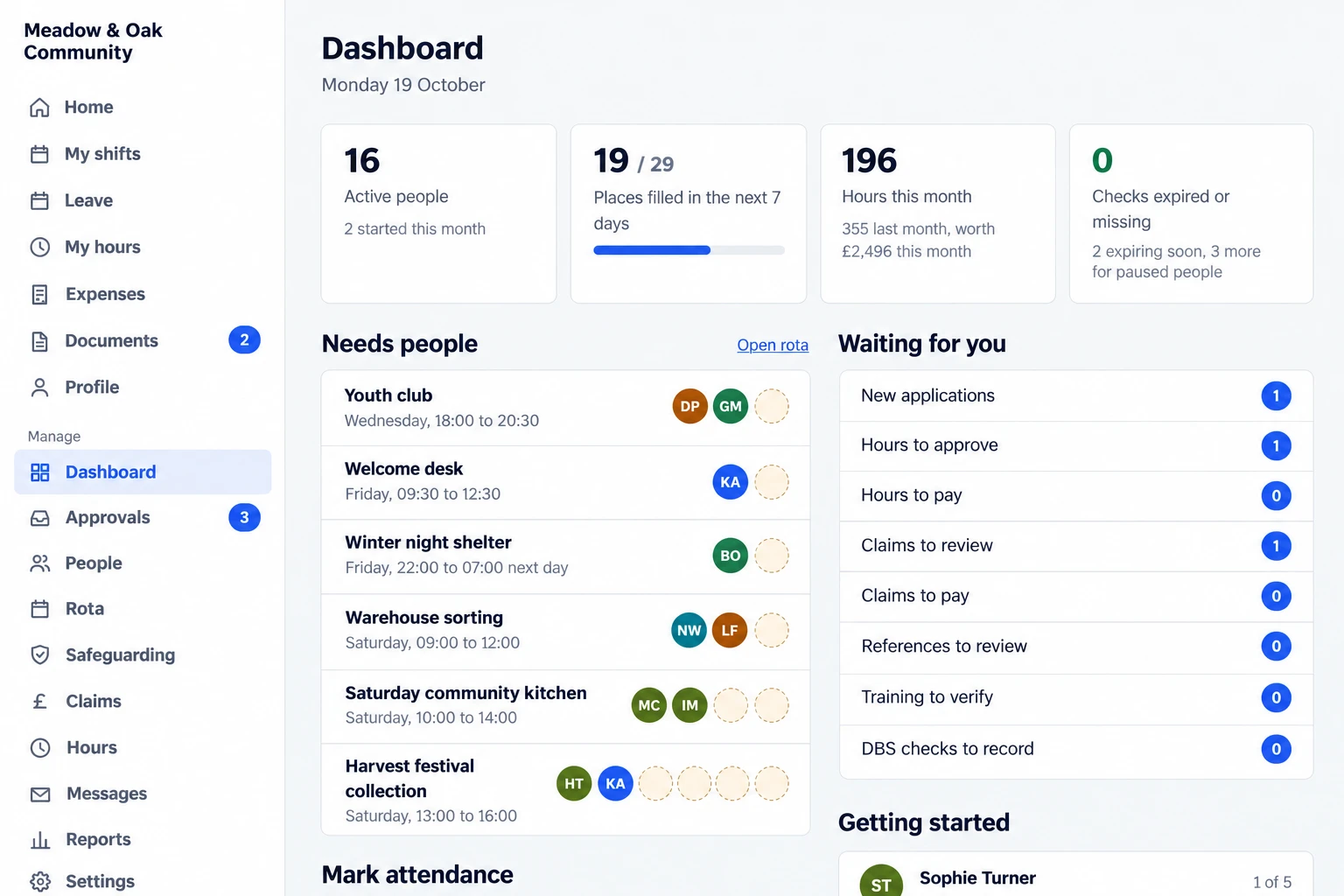
What needs you this morning
The dashboard shows the shifts still short of people, everything waiting for your decision and how the month is going.
- Headline figures: active people, places filled this week, and hours this month and what they cost
- Expired or missing checks counted, so an out-of-date DBS or food hygiene certificate is caught before the shift
- One queue for applications, hours, claims, references, training and DBS checks
- A getting-started tracker for each new starter
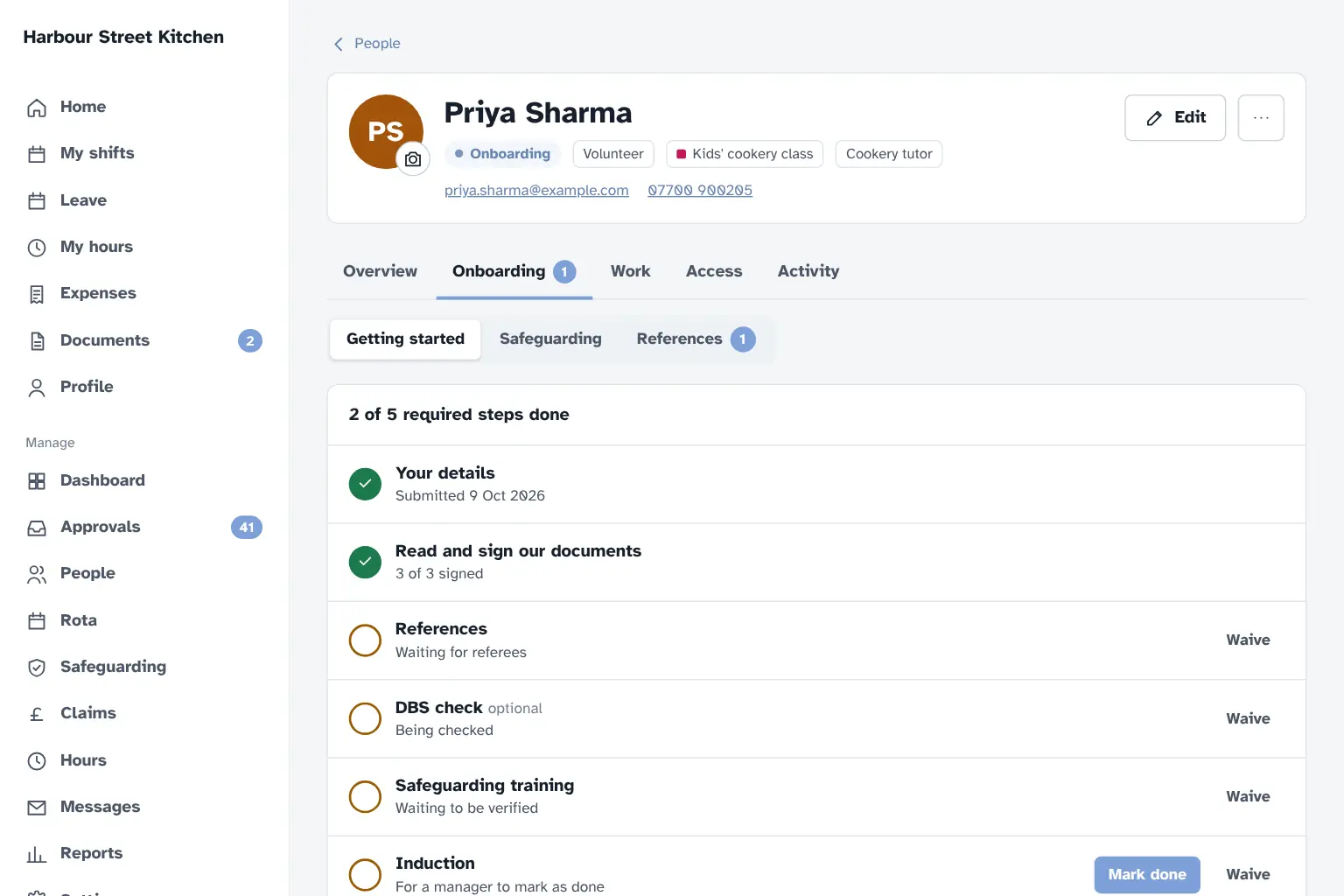
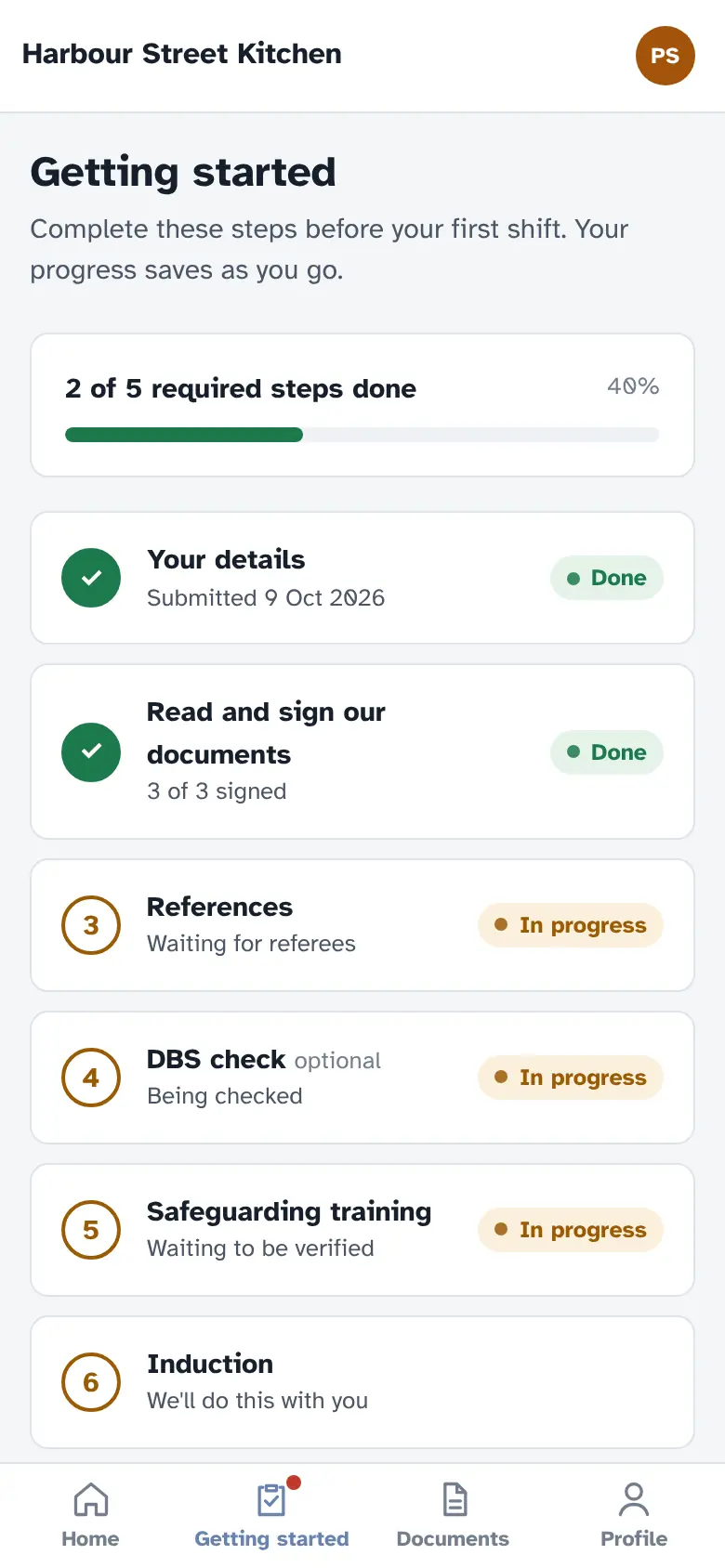
New starters ready before their first shift
Each new starter gets a checklist on their phone. You can see who has done what, and what you're still waiting for.
- A details form, documents to read and sign, references and a profile photo
- Checks you tick off yourself, such as right to work, ID seen or an induction
- Referees emailed a short form and chased until they reply
- DBS, food hygiene and other training recorded, with expiry dates tracked
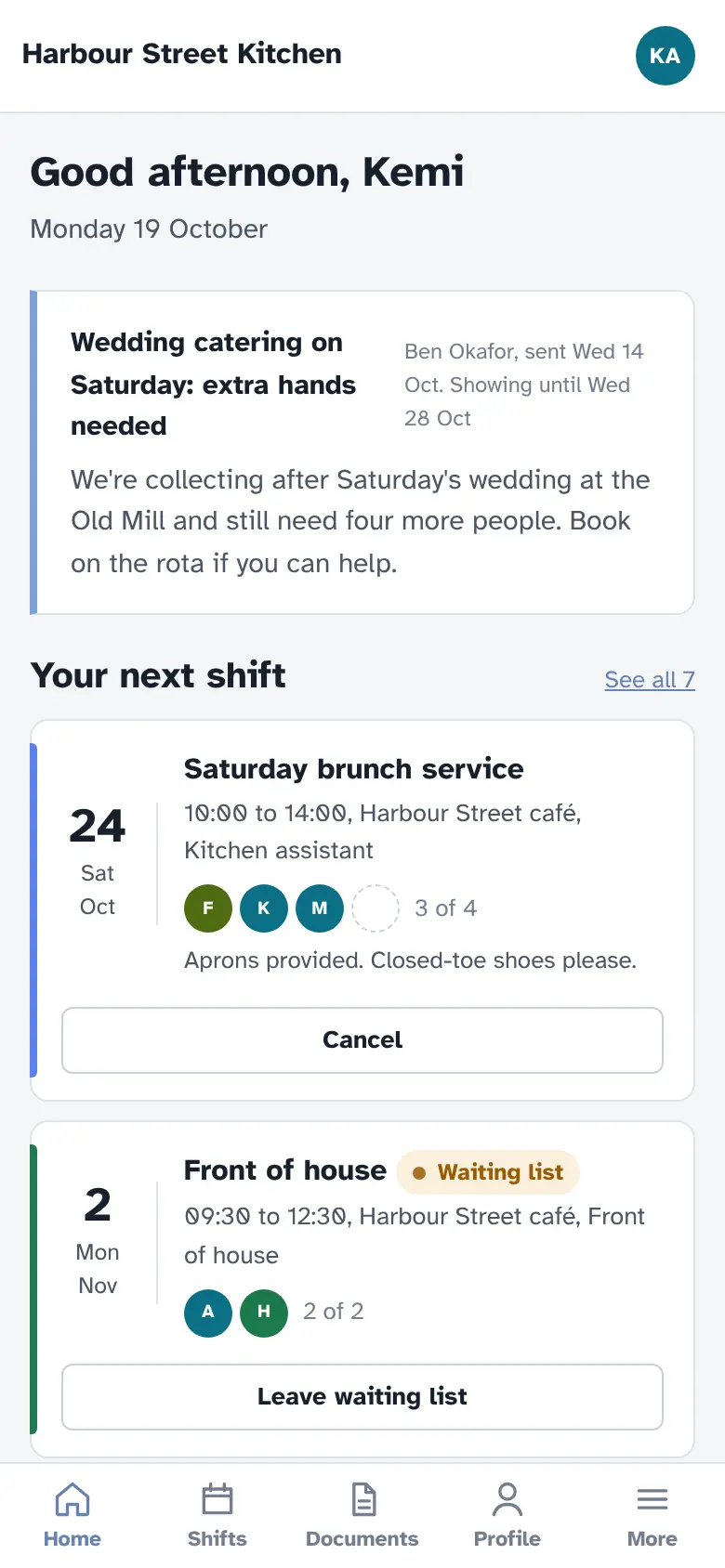
Your team gets an app too
Everything your staff and volunteers need, on their phone:
- See their rota and pick up open shifts
- Book leave and see how many days they have left
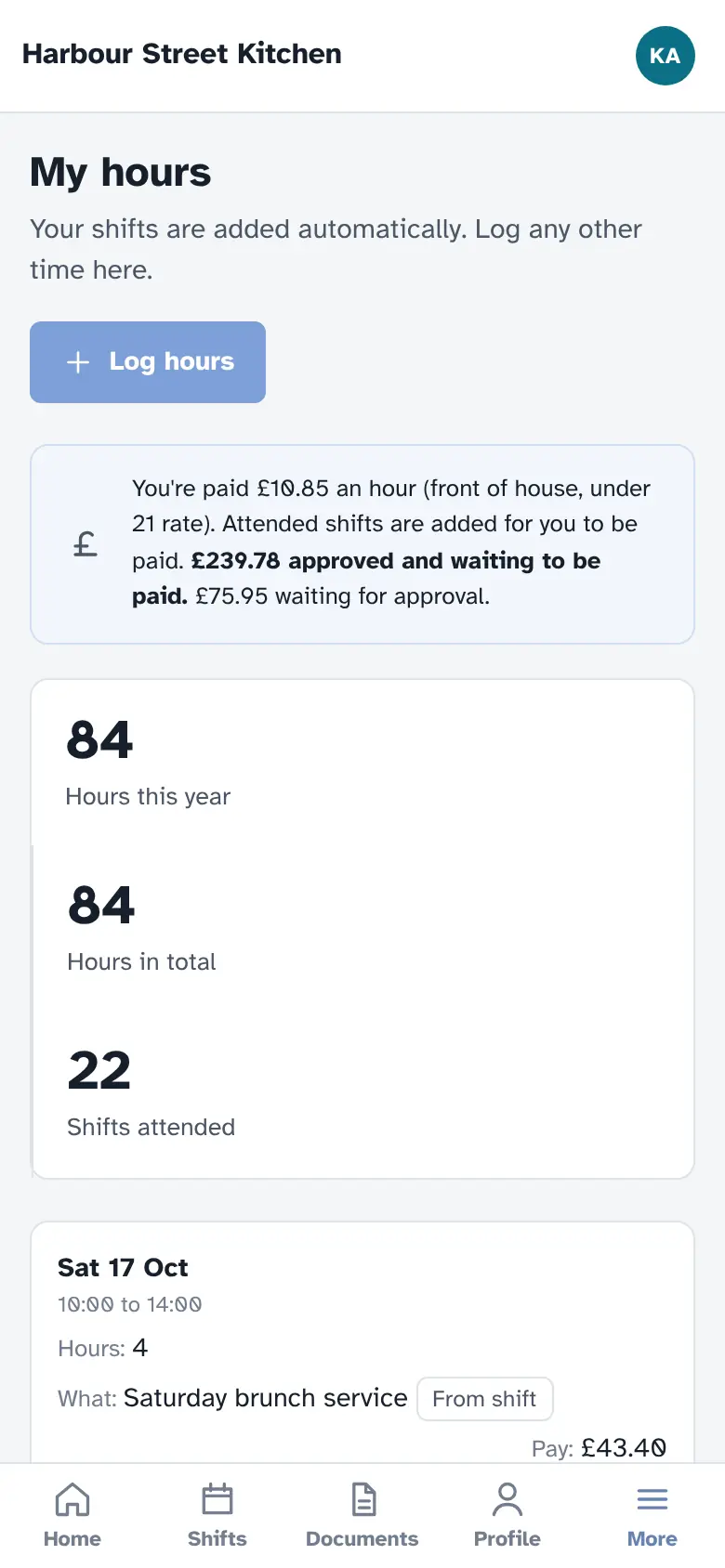
- Log hours and check their timesheets
- Claim expenses with a photo of the receipt
- Sign documents and finish onboarding
No app store and no passwords. They sign in with a link from their email and can add it to their home screen in a couple of taps.
Questions about shifts and booking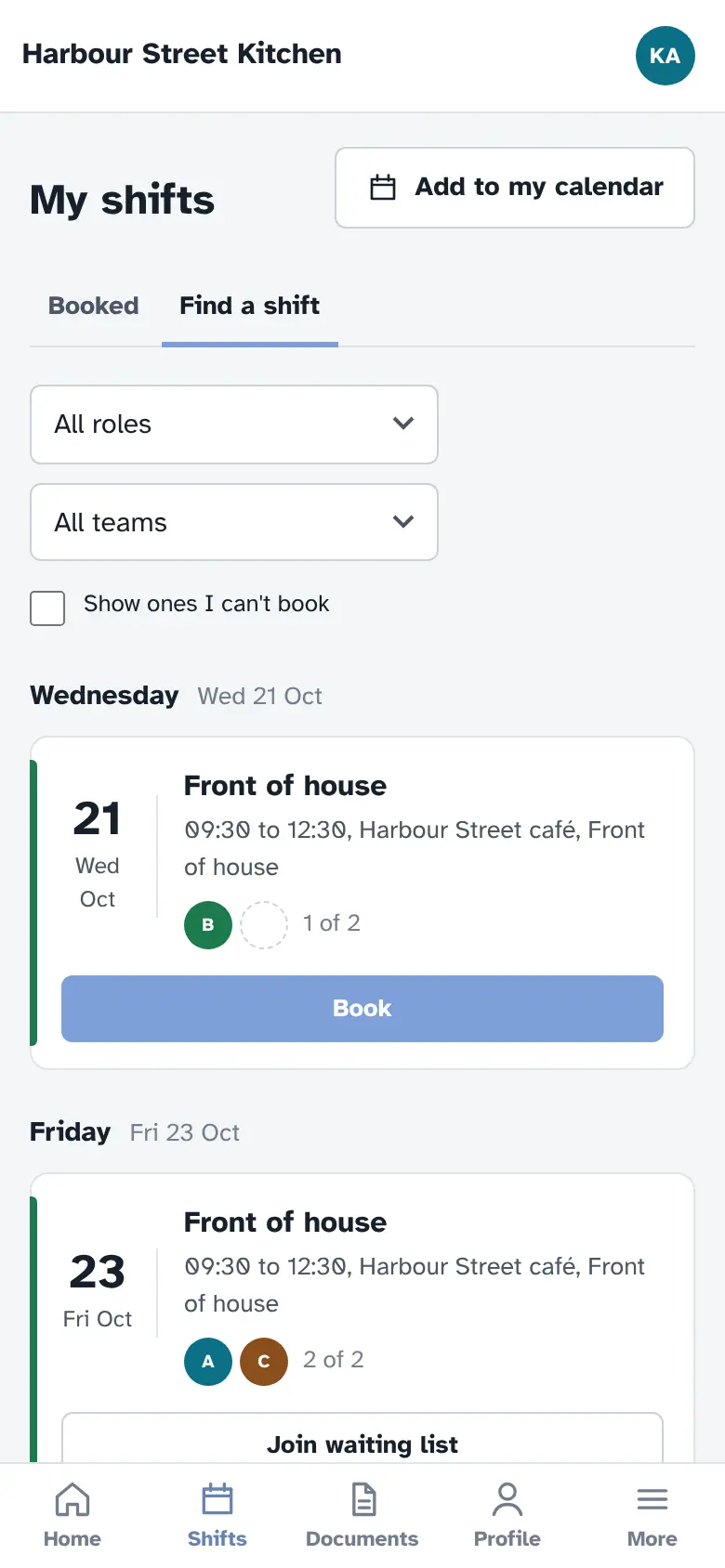
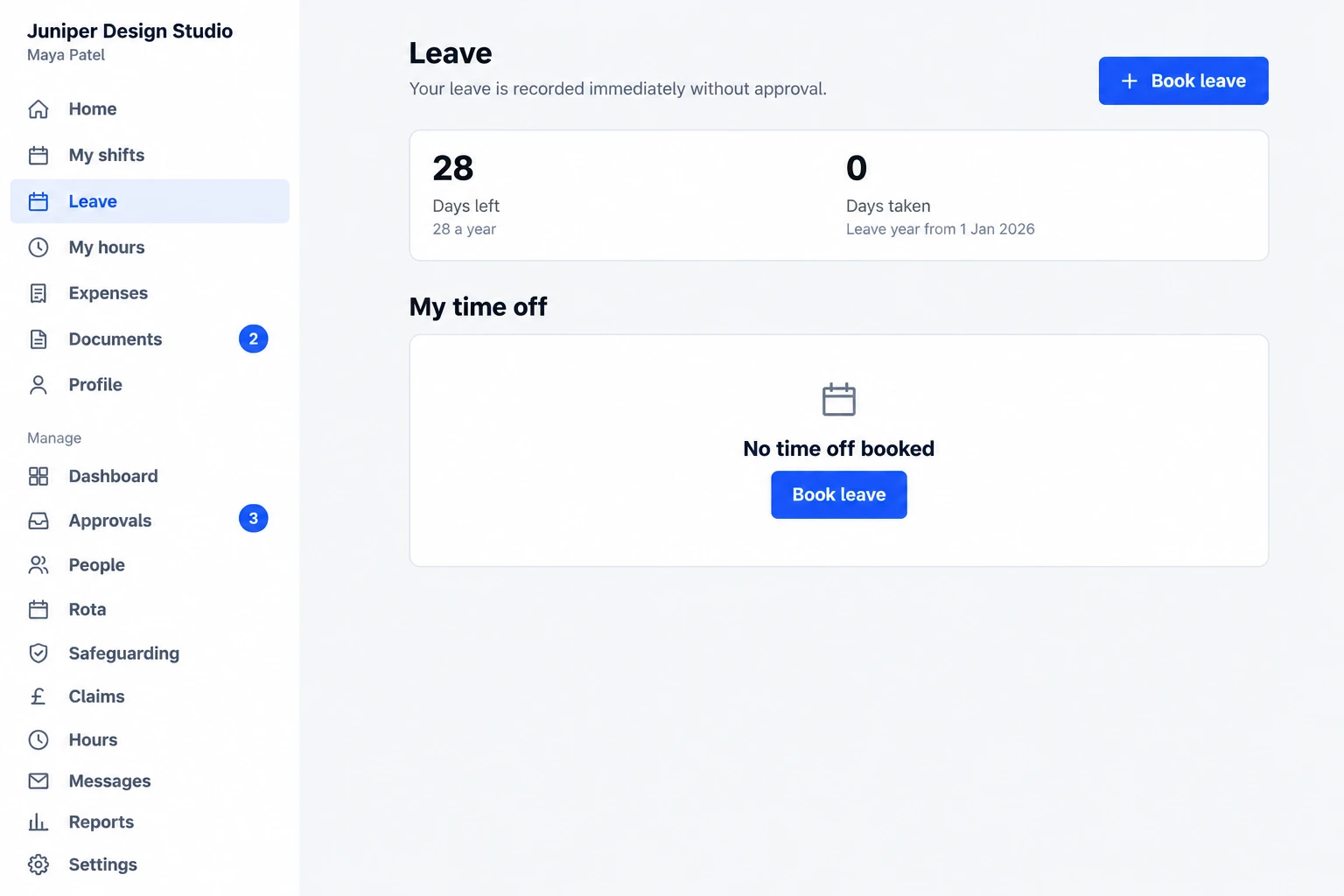
Leave requests and balances
Everyone can see how many days they have left and book time off in seconds. Requests go straight to their manager, or whoever is covering, and the balance updates itself.
- Allowances in days, with half days at the start or end of a booking
- Works for part-time and full-time staff alike
- Optional flexi time: extra hours worked build up and can be taken back as time off
- Your leave year starts in whichever month you choose
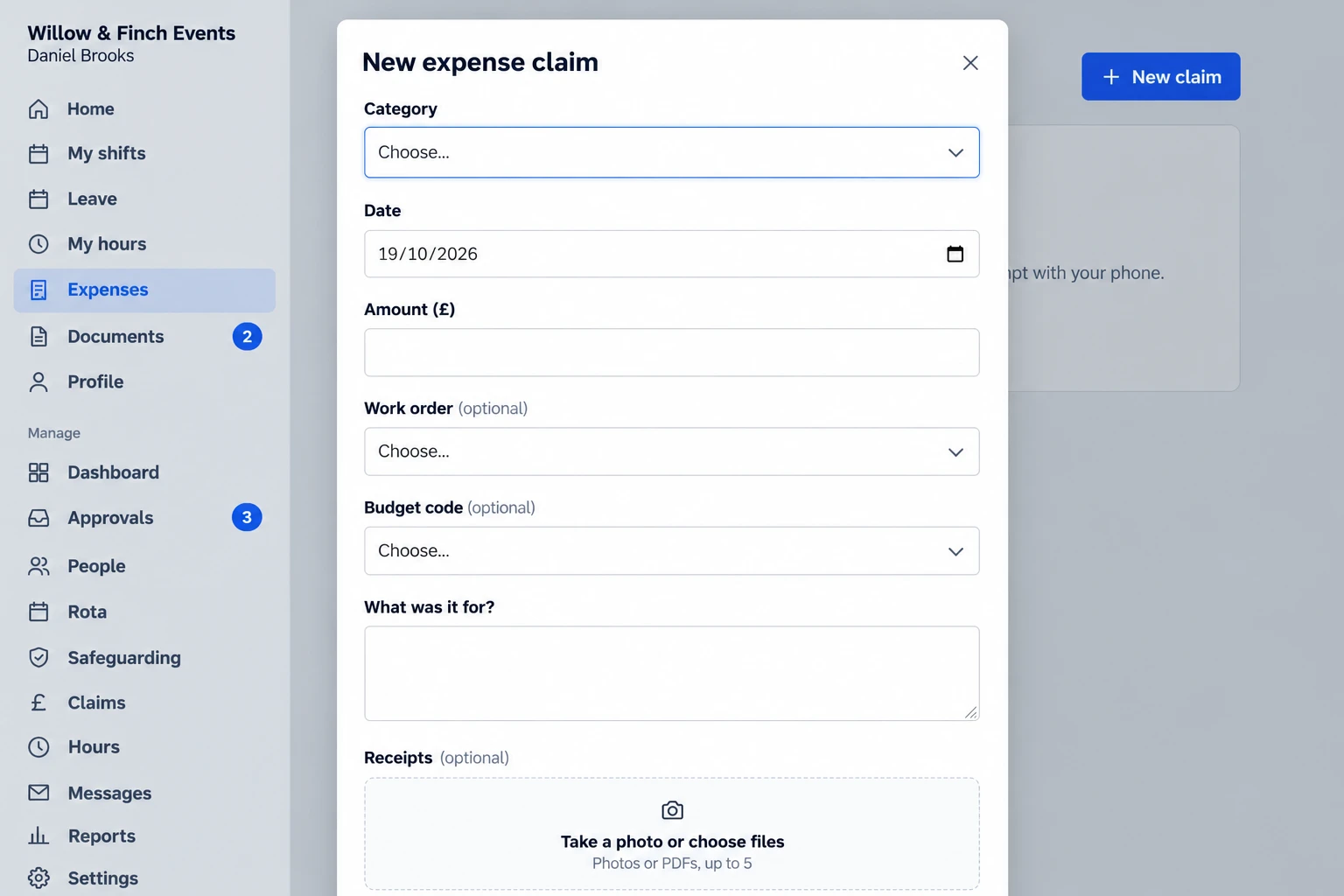
Expense claims from a phone
Take a photo of the receipt, pick a category, add the amount and send. Claims go to the right approver instead of sitting in someone's inbox, and everyone can see where theirs is up to.
- Up to five receipt photos or PDFs per claim, shrunk on the phone so they upload quickly
- Mileage at your rate, in miles or kilometres
- Optional work orders and budget codes, so you know where every pound belongs
- Approve, query or reject, then mark as paid, with every step logged
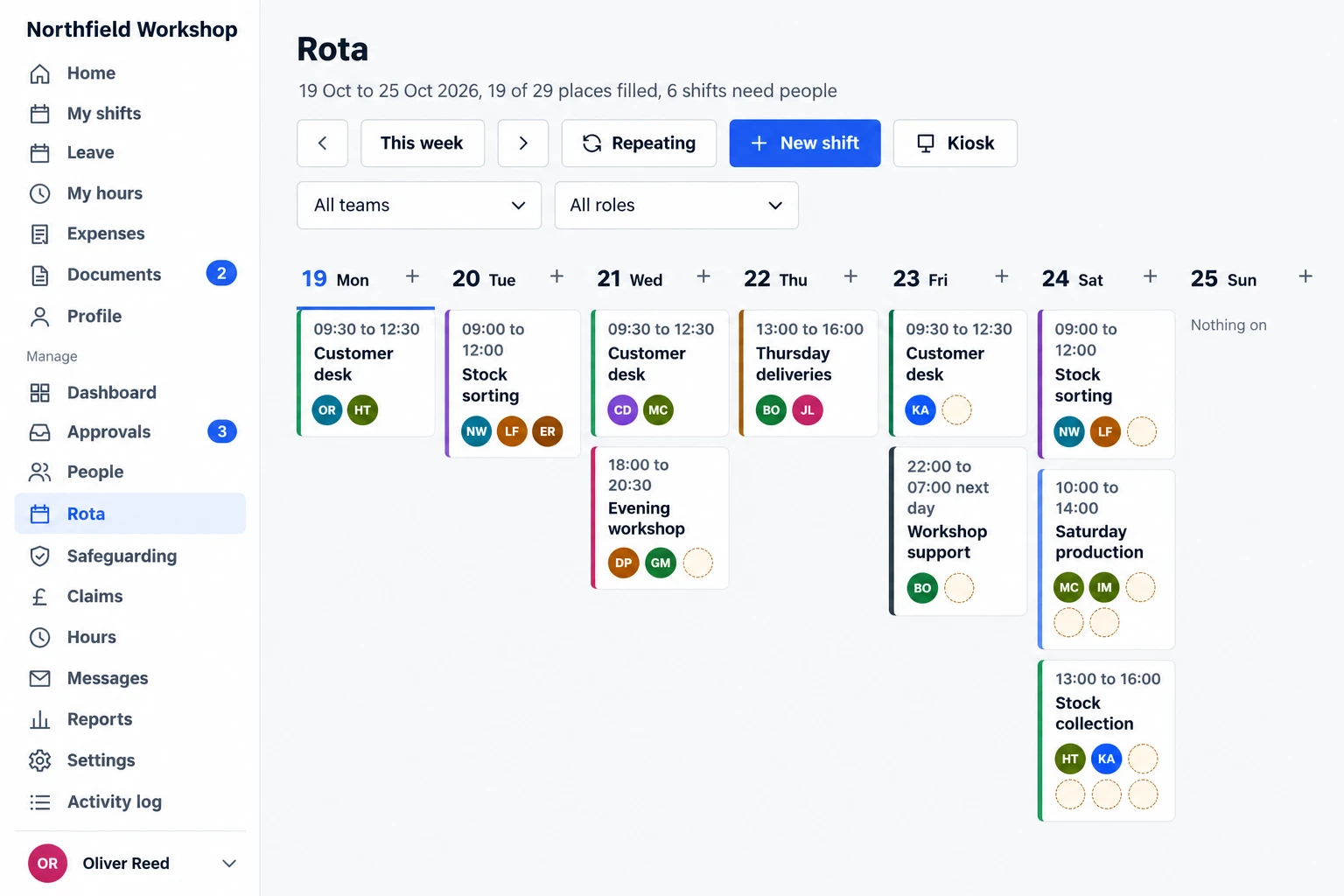
The week on one screen
See every shift, who's on it and which places are still empty. Gaps show up as dashed circles, so you spot them days ahead.
- Staff book open shifts themselves, or you assign everyone
- Full shifts have a waiting list that moves people up automatically
- Repeating shifts set up once, including overnight ones that finish the next day
- A check-in kiosk for your venue, which turns attendance into hours
Screens show a sample business. Yours will carry your own name, logo and wording.
Features
Everything your team needs, in one app
From the day someone applies to the day they're paid. Every part can be switched on or off, so you only see what you use.
Applications and sign-up
People apply through a sign-up page you can link from your website or share as a QR code. Applications land in one list, ready to move into onboarding.
Onboarding checklists
Each new starter works through a checklist on their phone: their details, documents to sign, right to work and anything else you need. You're told when they're ready.
References, DBS and training
Referees are emailed a form and chased until they reply. DBS checks, food hygiene and other training are recorded with expiry dates, and roles can require them.
Rotas and shift booking
Publish shifts for staff to book, or assign them yourself. Full shifts have a waiting list, reminders go out by email, and shifts can sync to Google, Apple or Outlook calendars.
Hours and timesheets
Hours for salaried, hourly and volunteer staff in one place. Shifts attended through the check-in kiosk become hours automatically, ready for you to approve.
Annual leave and flexi
Staff see their balance and book leave from their phone. Allowances work for part-time and full-time staff alike.
Pay and expenses
Approved hours and expense claims go on one list to pay, with a pay export for your payroll provider. Claims include receipt photos and mileage.
Documents, messages and reports
Send a policy for everyone to sign, email the whole team or one group, and download hours, people and expenses reports. Every change is logged.
Add your logo and colours, and use your own words for your staff, shifts and teams.
Getting set up
Get started with no setup fees
Your app, ready for your team
Choose your plan and we'll create your private app. Add your teams, roles and shifts, then invite everyone and choose who can see what. There are no setup fees on any plan.
Bring your data with CSV import
Import your team records from a CSV file yourself, so you don't have to enter everything again. CSV self-import is included in every plan, at no extra cost.
Who it's for
Small businesses that run on shifts
Especially useful if you have a mix of salaried, hourly and volunteer staff, or need checks like DBS for certain roles.
- Hospitality: cafés, pubs and restaurants Rotas, kiosk check-in and hourly pay
- Independent retail Rotas, leave and timesheets in one place
- Events and festivals Onboarding seasonal staff and volunteers quickly
- Childcare, tutoring and holiday clubs DBS checks, references and training tracked by role
- Leisure and activity providers Repeating sessions, with qualified staff on every one
- Charities and CICs Staff and volunteers together, with 30% off for registered charities
Security and your data
Your people's records, looked after properly
References, DBS status, pay rates and contact details need proper protection. This is how we look after them.
Separate, private data
Every business gets its own private database and file storage. Your records are never mixed with anyone else's, and all data is hosted in the UK/EU on Cloudflare's infrastructure.
Access you control
Permissions decide who sees what. Employees sign in with an emailed one-time code or link. Owners and managers also use an authenticator app, with single-use recovery codes if they lose their device. Everyone signs in again after 12 hours, and connections are encrypted throughout.
Your data stays yours
You're the data controller and we act only on your instructions as your processor. Export everything yourself at any time as CSV files, or ask us for a full copy.
Clear retention rules
If you leave, we export a full copy for you and delete your database and files within 30 days. Backups are overwritten within a further 60 days, after which recovery is impossible.
A written data processing agreement is available on request, and we'll tell you without undue delay if a breach ever affects your records. Read the full privacy notice.
Pricing
One flat price, every feature included
Most small teams pay for a rota app, an HR app and an expenses app separately. We're one app, one price. Work out what you'd pay elsewhere.
Join as a founding member
Help shape what comes next. Join while the founding offer is open.
then half price for as long as you stay.
- 6 months free from the day your app goes live. Save your payment details securely with Stripe, with nothing charged today
- Then half the standard price for your team size, for as long as you stay, once we have your testimonial
- No setup fees, with CSV self-import included
- Registered charity? Your founding place gets 50% off instead of the usual 30% charity discount
- Your suggestions go to the front of the queue
- In return: honest feedback, a short testimonial by the end of month 3 after your app goes live, and permission to feature your company logo and testimonial on our website. You'll approve what we publish
- No testimonial by then? You move to the standard price when the 6 free months end. Offer terms
Pricing
- 1–10 people£19 a month£190 a year £15.83 a month
- 11–25 people£39 a month£390 a year £32.50 a month
- 26–50 people£69 a month£690 a year £57.50 a month
- 51–100 people£119 a month£1,190 a year £99.17 a month
- 101+ peopleTalk to us
- Every feature in every plan
- No setup fees, with CSV self-import included
- Your own private app and database
- Email reminders, alerts and weekly summaries
- Email support from our UK team
No VAT to add. We're not VAT-registered, so the price you see is the price you pay.
Registered UK charity? You get 30% off. Select the charity option at checkout, enter your charity number and use your charity's official email. If you also join as a founding member, the founding offer applies instead.
"People" means the staff and volunteers with an account in your app.
No setup fees on monthly or annual plans.
Choose your planYour subscription renews automatically until you cancel. You can cancel easily through Stripe at any time using Manage billing. You'll keep access until the end of your billing period. See our terms of service.
Why is it cheaper?
We're a small UK company with no investors to answer to, no sales team and no fancy offices. The app runs on modern, efficient cloud infrastructure, so our costs are low and we pass that on. Every feature is in every plan, so there's nothing to upsell either.
Why we built this
A note from the founder
“I've spent years building and running the systems behind a large casual workforce at one of the UK's leading universities: rotas, onboarding, DBS checks, timesheets and pay. Small businesses have exactly the same headaches with none of the support. The tools out there are split across three apps that don't talk to each other, or you're paying high fees and extra for every add-on. If you're a larger organisation, setting up a new system can take months, if not years. Either way, they're rarely flexible enough. We've built flexibility and power in from the start, with everything in one place, at a price that works for a team of eight as well as eighty.”

No testimonials yet. We'd rather show you the real product than invent praise.
Questions
Common questions
How much does it cost?
From £19 a month for up to 10 people, with every feature included and no VAT to add. Pay annually and you get 2 months free, and registered charities get 30% off. While the founding offer is open, founding members get 6 months free, then half price for as long as they stay, in return for a testimonial. Founding charities get that 50% instead of the 30% charity discount. See pricing for every band.
How do we get set up?
Choose your plan and we'll create your private app. Import your team records from a CSV file, add your teams, roles and shifts, and invite everyone. CSV self-import is included, with no setup fees.
Who owns our data, and can we leave?
You own it. It sits in its own private database, separate from every other customer, and you can export it whenever you like. Your subscription renews automatically until you cancel. You can cancel easily through Stripe using Manage billing, with no cancellation fee, and keep access until the end of your billing period. If you leave, we export a full copy for you and delete your database within 30 days.
Does it work on phones?
Yes. It runs in any web browser, on phones, tablets and computers, and can be added to the home screen like an app on Android and iPhone, with no app store needed. It does need an internet connection to load and save.
Does it run our payroll?
No. It gives you one approved list of what to pay each person, with a pay export for your payroll provider or accountant, and you mark it as paid once the money has gone.
What if we only need some of it?
Every part, from the rota and onboarding to pay, expenses and the kiosk, can be switched on or off. Menus and permissions update to match, so you never see features you don't use. The price stays the same either way.
More questions? Our help pages cover rotas, onboarding, hours, leave and expenses in detail, or you can ask us anything.
Get your Friday afternoons back.
Founding customers get 6 months free, then half price for as long as they stay.
To keep the half price, we need a testimonial by the end of month 3 and permission to feature your company logo and testimonial on our website. You'll approve what we publish.
Get started
Tell us about your team
Two minutes, no commitment. A real person reads every message and replies within one working day.
Prefer email? Write to hello@myninetofive.co.uk.
Thanks, we've got it
Keep an eye on your inbox, and your spam folder just in case.